Building a Data Quality Pipeline with PySpark: Lessons from My First Data Engineering Project
A practical learning project with PySpark

This is my first data engineering project, following my experience in QA and project management. I have included all my learnings, from learning the basics to encountering many bugs, scouring the internet for answers, and asking many questions to my mentor, Chanukya . While building this project, I discovered that many tutorials assume you have an enterprise architecture, but what if someone is building without one? This project ‘spark-dq-checks’ is a data quality pipeline that validates 74 years of Swedish Crime Statistics. I hope it reaches anyone starting their journey and helps them avoid the mistakes I made during this project. It is a part I of the project, there is soon going to be part 2, in which there will be real world details, end to end usage of data quality checks integrations, to determine how enterprise would use this project.
What I have tried to include in the project:
I have attempted to implement a two-phase data-quality pipeline for which I have used PySpark and Spark Expectation.
I have included the setup challenges.
I have explained how my previous experience in testing helped me get into data quality work.
I have discussed common mistakes and their solutions.
I have tried to include what production-ready means for early learning projects.
Project Overview
The complete project has been uploaded to the Data & AI Stockholm GitHub Account.
Data set: Swedish Crime Statistics 1950-2023. The data has unique quality issues, format inconsistencies, missing values in critical fields, data entry errors, and gaps in error tracking.
Solution
I have designed a two-phase pipeline to handle the issue:
Phase 1
Do a basic validation check before operations.
Filters nulls, missing values, and casts data types.
It catches maximum issues before the data moves down the pipeline.
Phase 2
Utilizes Spark-Expectations for data validation.
Separates valid and invalid records automatically.
Provides the details of the error.
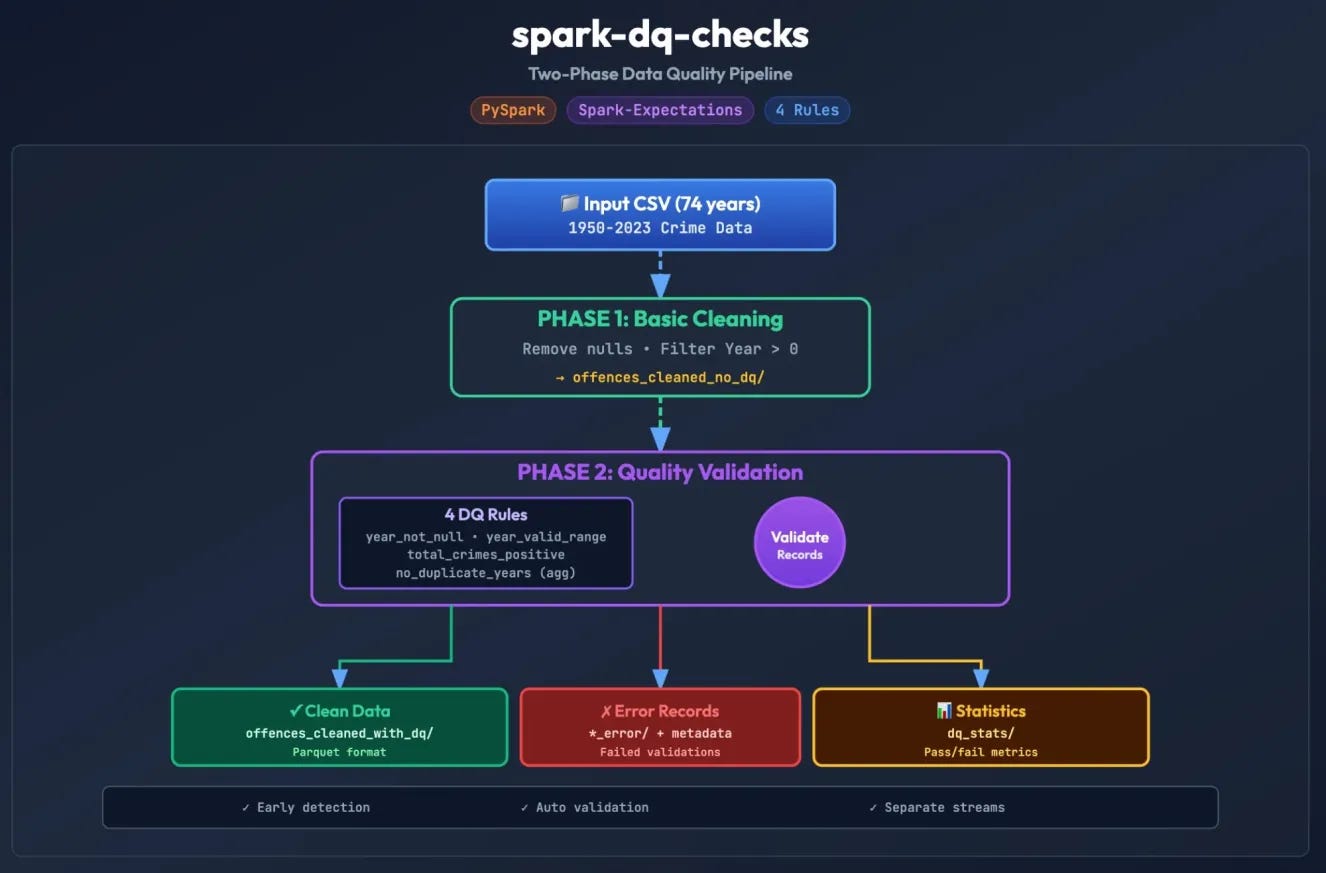
Architecture diagram
The Architecture diagram can be viewed here, which depicts the two phases of
‘dq check’, the data flows, and the components’ interactions.
Starting from data moving from CSV through both phases, splitting into three output streams: clean data, error records, and quality statistics.
Tech Stack:
PySpark: Used for distributed data processing.
Spark-Expectations: Nike’s open-source data quality framework.
Delta Lake: ACID transaction and reliability.
Python 3.x: Core language
UV: package management.
Real challenges and their solutions
Here I will discuss the problems I faced as a beginner and how I tried to resolve them.
These errors totally stopped my pipeline and were tough to debug since it was my first project, but they also taught me the most.
1st Challenge
Conflict in a virtual environment
While creating a virtual environment for my project to avoid affecting other Python projects and to avoid versioning issues, I kept getting stuck with CONDA. It interfered with the VE and would auto-activate, so even though pip pointed to venv, Python kept pointing to CONDA, causing the ModuleNotFoundError, even though the packages were installed.
pip install pyspark
# Success! ✓
python -c “import pyspark.”
# ModuleNotFoundError: No module named ‘pyspark.’
Solution
It is always a good start to make sure that “which python” and “which pip” are pointing to the same location. Isolating environments can be so critical for projects, so make sure to understand this first; things break.
which python
which pip
Fix: Understand which Python version you are using.
rm -rf .venv
conda deactivate
/usr/bin/python3 -m venv .venv
source .venv/bin/activate
pip install pyspark delta-spark spark-expectations
2nd Challenge
Misunderstanding Framework API
Spark-Expectations uses the decorator pattern and not the object initialization pattern. Understanding the difference between the two is very crucial. What I initially tried that did not work:
from spark_expectations.expectations import DataQualityRuleEngine dq_engine = DataQualityRuleEngine(spark=spark, rules=rules_df)
result = dq_engine.validate(df)
Solution
The correct implementation was to use decorators. It is a design pattern that will handle the validation failures and handles errors automatically like a quality validation. It can be used in multiple tables that makes it reusable and the code becomes clean, readable and reusable.
from spark_expectations.core.expectations import SparkExpectations
se = SparkExpectations( product_id=”spark_dq_project”, rules_df=rules_df, stats_table=”dq_stats”, stats_table_writer=writer, target_and_error_table_writer=writer )
@se.with_expectations( target_table=”offences_cleaned_with_dq”, write_to_table=True)
defprocess_data(df):
return df
result = process_data(df)
3rd Challenge
Local Development vs Cloud assumptions
That use of enterprise infrastructure did not match what I planned locally. The error I kept getting was:
“TypeError: SparkExpectations.__init__() missing 2 required positional arguments: ‘target_and_error_table_writer’ and ‘stats_table_writer’”
Solution
On looking deeper into it, I found that the Spark-Expectations library includes a helper class, WrappedDataFrameWriter, that provides the format for saving data, where to save, and the mode to use for the pipelines. When this class is used, there is no need to create custom writer classes.
Taking a closer look at the two phases of development
Phase 1: Basic cleaning of Data
This part was like a quick-win data cleaning using PySpark, as seen in the file “load_and_clean.py”, which catches almost 80% of issues quickly and reduces the data size before moving down to the pipeline for rule-based validations. This took about 2 minutes to execute, given the dataset’s size.
Phase 2: Rule-Based Validation
Before describing the DQ rules I followed, let's take a closer look into what they are and why they are important. Spark Expectations has a rule table that defines all data validation logic. Having a separate section for rules makes it easier to modify without code changes, supports easy version control, and can be shared across multiple pipelines. More about DQ rules can be read here – DQ Rules.
To understand rule-based validation, two files are important:
dq_setup.sql – This file includes 5 validation rules.
main.py – Currently, this project has 4 rules for local testing.
In the local implementation, one rule is missing because expected_year_count logs a warning; this works only when action_if_failed = “ignore”, which does not affect the local implementations.
DQ Rules that are implemented locally. Row-level validation rule that validates individual records and catches the bad ones. It enables automatic filtering of bad data and provides error information for each record.
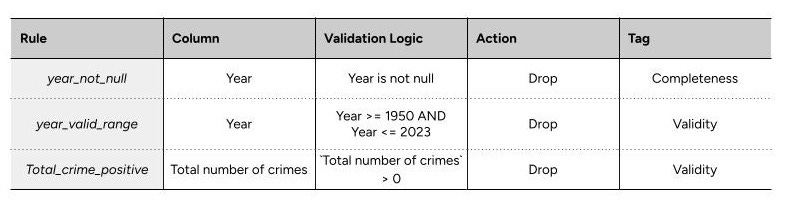
The invalid rows are removed from the clean dataset and saved separately for review.
Aggregate Validation (1 rule) helps catch pipeline-level issues and those that row-level checks miss. It stops the pipeline when it fails. The purpose of including this was to know if the data is missing an entire year, as if only 73 years were loaded instead of 74.
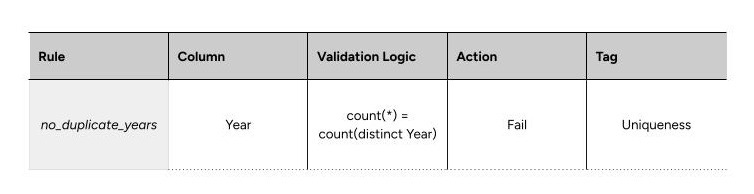
Both row-level and aggregate validation together provide a holistic dataset validation.
Configuration
This helped point Spark-Expectation on how to run and where to save error records, statistics, validated data, and the rules being applied. The clean data is being saved to offences_cleaned_with_dq/.
Saving the error to offences_cleaned_with_dq_error/ and saving the statistics to dq_stats/, applying the DQ rules.
Storage of data
For local development, the storage format I thought might be better had some issues; CSV and JSON both had disadvantages. The more viable option, per industry standards, was Parquet, which is used by Spark, Pandas, etc., and Databricks uses it internally, so it was the best option for this project. With no external dependencies, it was a win-win. However, other formats can also be used. However, if storage were done in production in Databricks, Delta would be the obvious choice.
Learnings and recommendations
For a first data engineering project, there is a lot to learn and improve in this project and all the upcoming ones, but it was surely a huge learning experience, and I would like to thank Data & AI Stockholm for giving me this opportunity to work on this project with the help of peer guidance. I gained hands-on experience with data quality frameworks, practical debugging in a newer domain, and creating my first data pipeline.
Part 2 of this project will handle real world details of data quality checks and how would an enterprise use it will be coming soon with more of my personal learning and challenges.
For someone transitioning to data engineering, my recommendation would be to start small, understand existing projects, record all your failures (they are the most important), and keep asking for help. With such a strong community now, it is possible!
Resources and referred examples:
Bartosz Konieczny’s Spark Playground: https://github.com/bartosz25/spark-playground/tree/master/spark-expectations-demo
Practical Data Engineering Examples: https://github.com/ssp-data/practical-data-engineering
Spark-Expectations Documentation: https://engineering.nike.com/spark-expectations/
PySpark Documentation: https://spark.apache.org/docs/latest/api/python/
Delta Lake: https://docs.delta.io/
Swedish Crime Statistics (1950-2023) - Brå (Brottsförebyggande rådet)
 | A guest post by
|